


Download Syston Data Recovery – Free File Recovery Tool for Windows & Mac
Syston Data Recovery is a powerful, free data recovery software designed for Windows and Mac users who need to retrieve lost, deleted, or corrupted files. Whether you accidentally deleted a folder, reformatted a drive, or suffered a system crash, this reliable tool can help recover your precious data. With support for over 500 file types and compatibility with NTFS, FAT32, exFAT, HFS+, and APFS file systems, Syston Data Recovery ensures maximum recovery potential.
The intuitive interface makes it easy for beginners, while advanced scanning options like Quick Scan and Deep Scan cater to more complex recovery scenarios. Best of all, it’s completely free to use—no hidden fees or watermarks. For users needing additional features like file previews and faster recovery, a professional version is available.
Syston Data Recovery is a trusted solution recommended by tech experts and praised for its performance and security.
Powerful Recovery Features for Every User
Syston Data Recovery stands out in the crowded field of data recovery tools due to its comprehensive feature set and user-centric design. At its core, the software offers two intelligent scanning modes: Quick Scan and Deep Scan. The Quick Scan is ideal for recently deleted files, typically completing within minutes and focusing on easily accessible file entries. For more severe cases—such as data loss after drive formatting, corruption, or accidental deletion—Deep Scan dives deeper into the storage medium, analyzing every sector to locate hidden or fragmented files. This thorough approach significantly increases the chances of successful recovery, even in complex situations.
One of the most impressive aspects of Syston Data Recovery is its extensive file type support. It can recover over 500 different formats, including high-priority file types like JPEG, PNG, MP4, AVI, DOCX, PDF, ZIP, and more. Whether you're trying to recover irreplaceable family photos, important work documents, or critical audio files, the software handles them all with precision. Additionally, it supports a wide range of storage devices, including internal hard drives, external SSDs, USB flash drives, memory cards, digital cameras, and even mobile phones (with proper connection). The software is also non-invasive—it never alters the original data during the recovery process, ensuring that your files remain intact and safe.
Another standout feature is its cross-platform compatibility. Syston Data Recovery is available for both Windows (7 and later) and macOS (10.13 and above), making it a versatile choice for users across different ecosystems. The installation process is straightforward, and the interface is clean and intuitive, requiring no technical expertise. Whether you're a student, professional, or casual user, you’ll find the tool easy to navigate. With regular updates and a strong focus on security, Syston Data Recovery continues to be a top choice for anyone seeking a reliable, free solution to recover lost data.
- Supports over 500 file types including photos, videos, documents, audio, and archives
- Two scanning modes: Quick Scan and Deep Scan for flexible recovery options
- Compatible with Windows and Mac operating systems
- Works with external drives, USBs, SD cards, and mobile devices
- Non-destructive recovery—no data modification during scanning
- Regular software updates for improved performance and security
Easy Installation & Step-by-Step Usage Guide
Getting started with Syston Data Recovery is a breeze, even for users with no technical background. The download process is secure and fast, with no bundled malware or unwanted toolbars. Once you’ve downloaded the installer from the official website, simply run the file and follow the on-screen prompts. The installation wizard is straightforward, requiring just a few clicks to complete. After installation, launch the application, and you’ll be greeted with a clean, modern interface that guides you through the recovery process step by step.
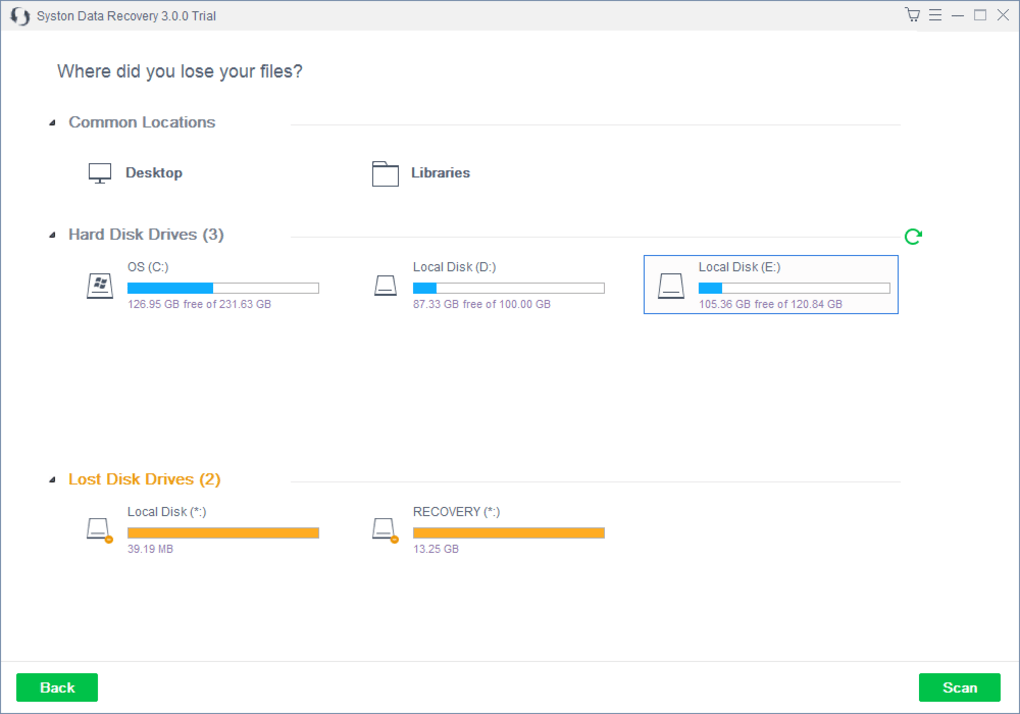
The recovery workflow consists of only three simple steps. First, select the drive or device you want to scan—this could be your internal hard drive, an external SSD, a USB stick, or a memory card. Second, choose your scan type: Quick Scan for recently deleted files or Deep Scan for more complex data loss scenarios.
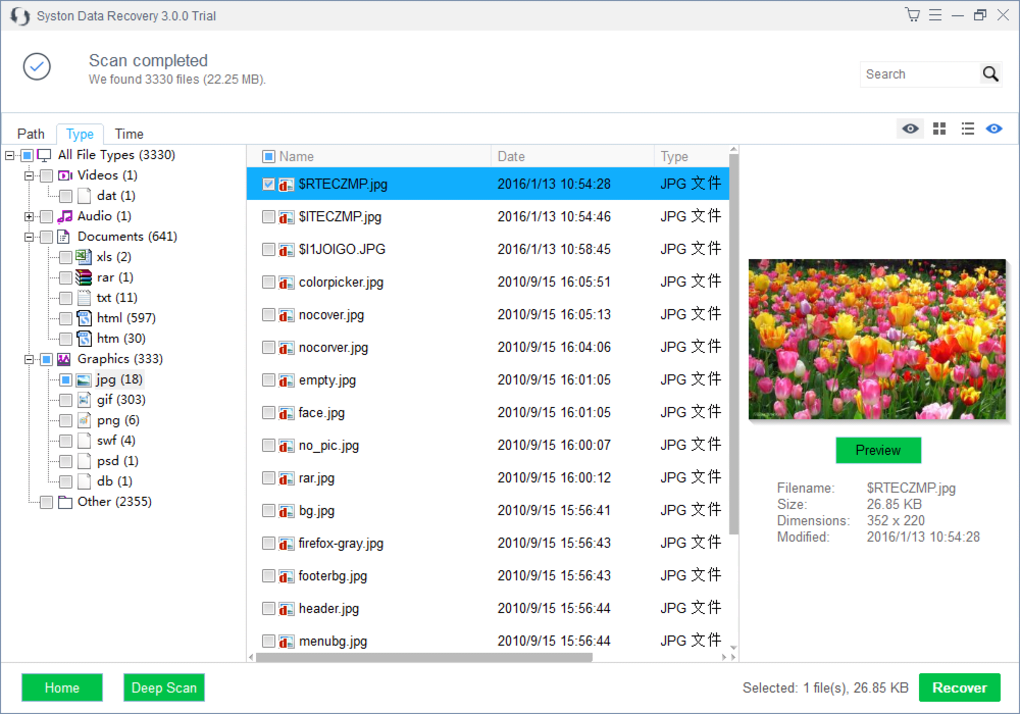
The software will then begin analyzing the selected device, displaying real-time progress and estimated completion time. Third, once the scan finishes, a detailed list of recoverable files appears. You can preview files (in the Pro version) and selectively choose which ones to restore.
Simply select the desired files, choose a safe destination (preferably a different drive to avoid overwriting), and click “Recover.”
It’s important to note that the sooner you act after data loss, the higher your chances of recovery. Avoid writing new data to the affected drive, as this can overwrite deleted files and reduce recovery success. For optimal results, use Syston Data Recovery immediately after noticing data loss. The tool is lightweight and doesn’t consume excessive system resources, so it runs smoothly even on older machines. Additionally, the software is regularly updated to maintain compatibility with new operating systems and storage technologies, ensuring long-term usability.
Compatibility & System Requirements
Syston Data Recovery is engineered for broad compatibility, making it accessible to a wide range of users. It runs smoothly on both Windows and Mac platforms, supporting Windows 7 and later versions, as well as macOS 10.13 (High Sierra) and newer. This cross-platform support ensures that whether you’re using a modern laptop or an older desktop, you can rely on Syston Data Recovery to help recover your lost files. The software is also compatible with various storage devices, including internal hard drives, SSDs, external USB drives, memory cards, and even digital cameras and smartphones when connected via USB.
For Windows users, the software supports major file systems such as NTFS, FAT32, exFAT, and ReFS. Mac users benefit from compatibility with HFS+ and APFS, the native file systems of macOS. This ensures that files are recovered accurately, regardless of the drive’s original format. The application is lightweight and doesn’t require high-end hardware—minimum system requirements include a 1 GHz processor, 512 MB RAM, and 100 MB of free disk space. These modest requirements make it suitable for older systems, allowing users to recover data without needing to upgrade their hardware.
Additionally, Syston Data Recovery is designed with security in mind. It operates in read-only mode during scans, meaning it never modifies the original data. This non-destructive approach is crucial for preserving file integrity and increasing the likelihood of successful recovery. The software also includes automatic updates to fix bugs, improve performance, and enhance compatibility with emerging technologies. Whether you're a student recovering a thesis, a photographer retrieving lost photos, or a business user restoring critical documents, Syston Data Recovery delivers reliable performance across all supported platforms.
- Compatible with Windows 7 and later
- Supports macOS 10.13 and above
- Works with NTFS, FAT32, exFAT, HFS+, APFS
- Supports USB drives, SD cards, external hard drives
- Lightweight with minimal system resource usage
- Regular updates for security and compatibility
Pros and Cons at a Glance
- Pros:
- Completely free to use with no hidden costs
- Supports over 500 file types across multiple formats
- Two scanning modes for different recovery needs
- Non-destructive recovery ensures data safety
- Easy-to-use interface for beginners
- Compatible with Windows and Mac systems
- Fast and reliable performance with regular updates
- Cons:
- File preview feature only available in the Pro version
- Deep Scan can take longer on large drives
- Advanced recovery tools require a paid upgrade
- No built-in backup or scheduling features
- Support limited to desktop and external devices (no cloud integration)
Frequently Asked Questions (FAQ)
Is Syston Data Recovery really free?
Yes, Syston Data Recovery offers a fully free version that allows users to recover lost files without any cost. The free edition includes core recovery features like Quick and Deep Scan, support for multiple file types, and compatibility with Windows and Mac. However, advanced features such as file preview and faster scanning are available only in the paid Pro version.
Can I recover files after formatting a drive?
Yes, Syston Data Recovery is specifically designed to recover data after accidental formatting. As long as new data hasn’t been written to the drive, the software can scan and retrieve lost files from formatted partitions. It works with NTFS, FAT32, exFAT, and other file systems commonly used in Windows and Mac environments.
Does the software work on Mac computers?
Absolutely. Syston Data Recovery is available for macOS 10.13 and later. It supports HFS+ and APFS file systems and can recover data from internal drives, external SSDs, USB sticks, and memory cards connected to Mac devices.
How long does a Deep Scan take?
The duration of a Deep Scan depends on the size of the drive and the amount of data to analyze. On smaller drives, it may take 10–20 minutes. For larger drives (e.g., 1TB), it could take several hours. It’s recommended to let the scan complete without interruption for the best results.
Can I recover files from a corrupted hard drive?
Yes, Syston Data Recovery can recover files from corrupted or damaged drives, especially when the corruption hasn’t caused physical damage. The Deep Scan feature is particularly effective in such cases. However, if the drive is physically damaged, professional data recovery services may be required.
Final Verdict: A Must-Have Tool for Data Recovery
If you’ve ever lost important files due to accidental deletion, formatting, or system errors, Syston Data Recovery is a reliable, secure, and free solution you can trust. Its powerful scanning engines, broad file type support, and compatibility with both Windows and Mac make it a top-tier choice for personal and light professional use. While the free version may lack some advanced features like file previews, it delivers exceptional value for the price—zero.
For users who need faster scans, better recovery accuracy, or the ability to preview files before recovery, upgrading to the Pro version is a worthwhile investment. But even without the upgrade, Syston Data Recovery stands out as one of the most effective free tools available. Its non-destructive approach ensures your original data remains untouched, and its regular updates keep it secure and efficient.
Don’t wait until it’s too late. Download Syston Data Recovery today and protect your digital memories, work, and important documents. Whether you’re a student, professional, or casual user, this tool is your first line of defense against data loss.
Download Syston Data Recovery now—secure, fast, and completely free.







